CPU & RAM
Windows system counters for CPU load and memory use.
Gaming tools / Preview · Signed 28 October 2026
Know what the machine is up to.
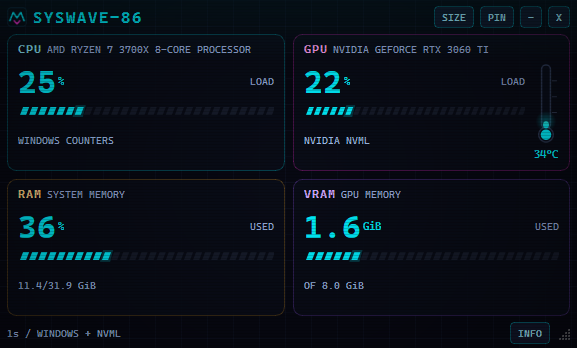
A compact, ’80s-inspired Windows dashboard for CPU, RAM and first-NVIDIA-GPU readings, with a dedicated VRAM card.
First launch: understand the Windows warning
25,249,078 bytes · 24.08 MiB · Hosted on GitHub
The application executable is digitally signed by Mythvector Games LLC with a trusted timestamp. Windows may still display a SmartScreen reputation warning. Check the signature and follow your Windows security policy; do not disable security protections.
Before the first run
Signed release packaging updated 28 October 2026. Application code is unchanged.
The application executable is digitally signed by Mythvector Games LLC with a trusted timestamp. Windows may still display a SmartScreen reputation warning. Check the signature and follow your Windows security policy; do not disable security protections.
Do not disable Defender, SmartScreen or Smart App Control, or alter security policy to make the app run.
A signature identifies the publisher and protects file integrity; it is not a security audit or a guarantee of compatibility or safety. Microsoft’s SmartScreen guidance.
Read the signed-release launch guide. Earlier unsigned-release guides are historical and do not describe this package.
01 / What it shows
Windows system counters for CPU load and memory use.
Load and GPU die temperature from the first NVIDIA GPU, through its installed driver.
Used and total graphics memory in GiB, with its own card and bar.
Readings refresh once per second and pause while minimized. Missing or unsupported sources show N/A with a reason. CPU temperature and FPS/frametime are not offered.
02 / Before you run it
The app does not require administrator rights for the tested CPU/RAM/NVIDIA telemetry path. Your system policies and driver availability may differ.
03 / Local by design
The reviewed original application code does not upload telemetry. Startup errors may create a local error log. Optional diagnostic mode writes local measurements and a screenshot; those files may include machine details and local paths.
Diagnostics stay on your machine. Review and redact them before sharing. The source review and bounded local tests are not a universal security or network-behavior guarantee.
04 / Check the file
Download the SHA-256 checksum. A checksum helps check file integrity. It is not a publisher signature or a guarantee of safety.
05 / Source & terms
Original application code and original artwork are licensed under MIT. Bundled dependencies keep their own terms; the MIT license does not relicense them.
Provided “AS IS”, without warranties to the extent permitted by law. Nothing in this notice excludes rights or remedies that cannot lawfully be excluded.
The portable ZIP includes full license and notice texts. Qt/PySide6/Shiboken 6.11.2 are used under LGPLv3. Python, psutil, NVIDIA’s wrapper, PyInstaller and Microsoft runtime components retain their applicable terms. Microsoft terms apply to Microsoft component code, not the original MIT code or LGPL modification/debugging rights.
Exact corresponding-source archives are available from the official Qt links below. The notices explain replacing the external compatible Qt libraries and rebuilding the original application. A bit-for-bit independent rebuild is not claimed.
Original source ZIP: 43,582 bytes
SHA-256: 55856fbc17b4b80e7c6a47e046e8d3449b5e1eada1f20f567706d7c2aed02235
If an upstream source link becomes unavailable, contact admin@mythvectorgames.com about equivalent source access.